The Best Headless CMS for Astro in 2026
Astro is the fastest way to build content sites — but most CMS options either cost too much, add bloat, or lock you in. Here's how to pick the right one, and why we built our own.
The CMS problem nobody talks about
Astro is fast. Embarrassingly fast. A well-built Astro site ships zero JavaScript, scores 100 on Lighthouse, and loads before your visitor’s finger leaves the screen. That is why we build every theme on Astro.
But then you need a CMS. You need your client to edit text without opening a pull request. You need a non-technical person to publish a blog post. And this is where the cracks appear.
Here’s the uncomfortable truth: most headless CMS options actively undo what makes Astro great.
They inject preview scripts. They add API calls that block rendering. They ship JavaScript that your static page does not need. You spend hours optimizing your Astro build to ship zero bytes of JS, then your CMS drops a 50KB tracking snippet into the HTML.
We have been through this. Every option on the market has a tradeoff that hurts.
The JavaScript tax
Before we look at specific products, let’s talk about why this matters. A CMS that ships JavaScript to your frontend is not a minor inconvenience. It is a measurable performance penalty that affects your search rankings, your bounce rate, and your revenue.
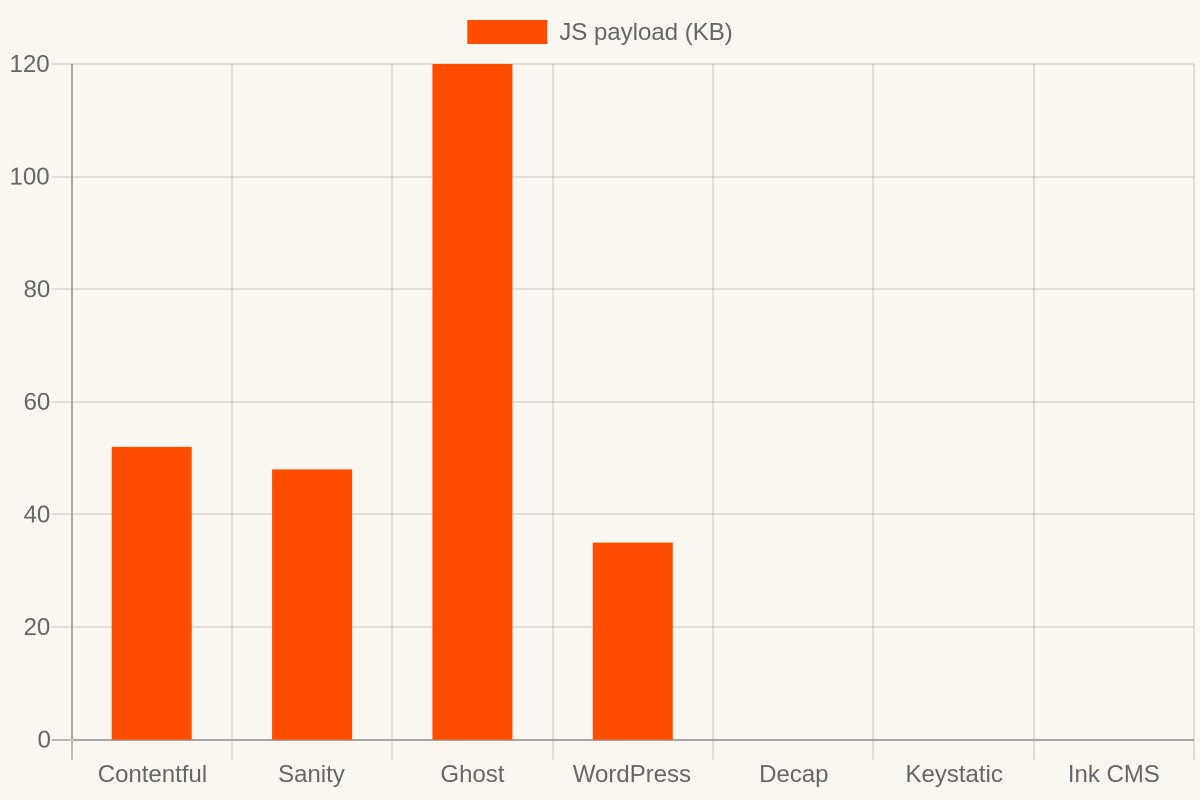
Here is what happens when your CMS injects 50KB of JavaScript into a page that was supposed to ship zero:
Search ranking drops. Google’s Core Web Vitals measure Interaction to Next Paint (INP), which is directly driven by main thread blocking. That 50KB script? It parses, compiles, and executes on your visitor’s main thread. On a mid-range Android phone — the device half your visitors actually use — that takes 150-300ms of blocked main thread time. Google considers anything above 200ms “poor.” You went from a perfect score to a poor score because your CMS wanted to show a live preview bar.
Bounce rate climbs. Google’s own research shows that as page load time goes from 1 second to 3 seconds, bounce probability jumps 32%. That CMS script adds 300-800ms to your initial load on mobile. You don’t see it on your MacBook. Your customers see it on their phones.
Conversion rate falls. Walmart found that every 100ms of load time improvement increased conversions by 1%. The reverse is also true. Every 100ms your CMS adds costs you money.
The irony is brutal. You chose Astro specifically because it ships zero JavaScript. Then your CMS quietly adds more JS than a Next.js page.
The landscape, honestly
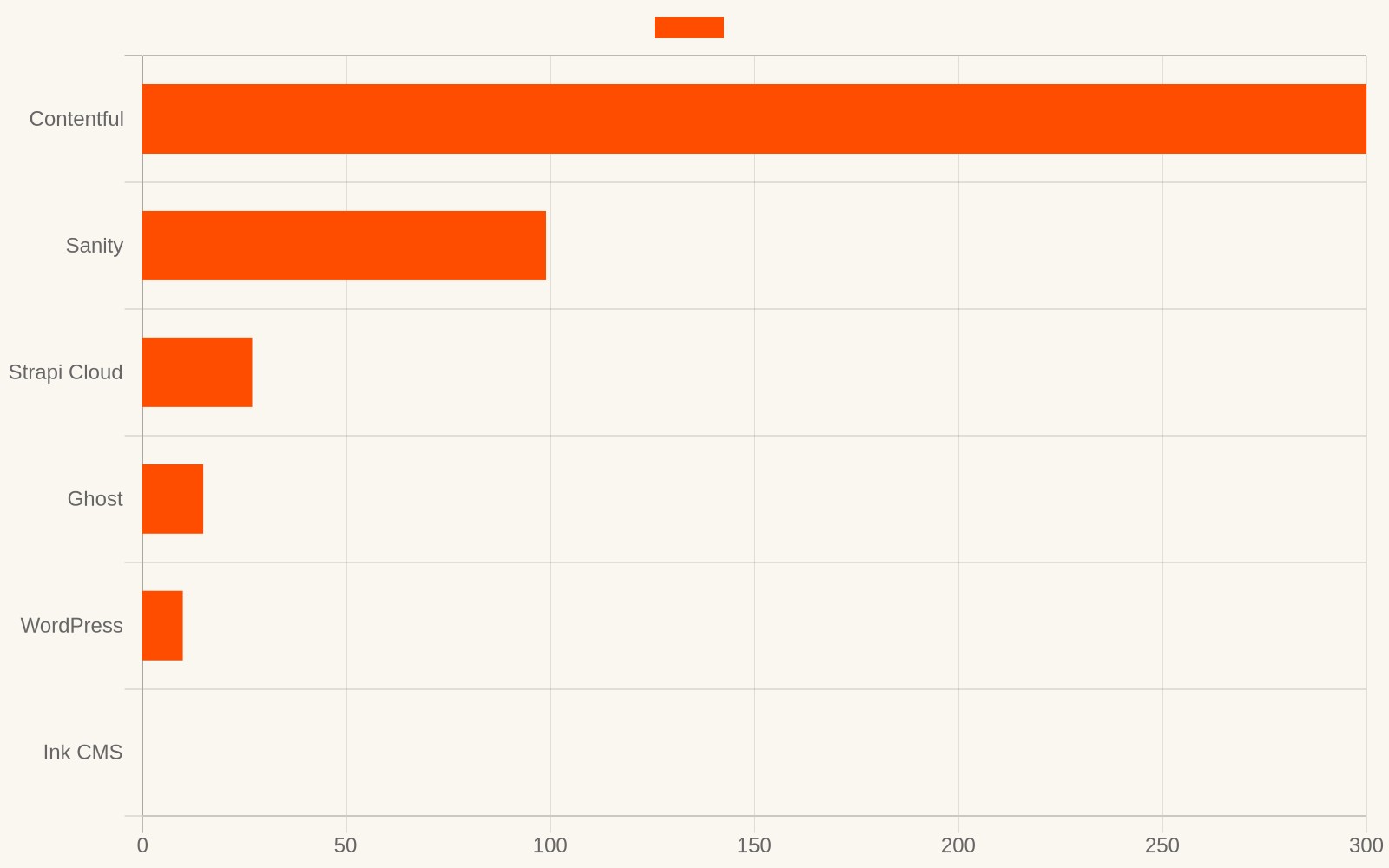
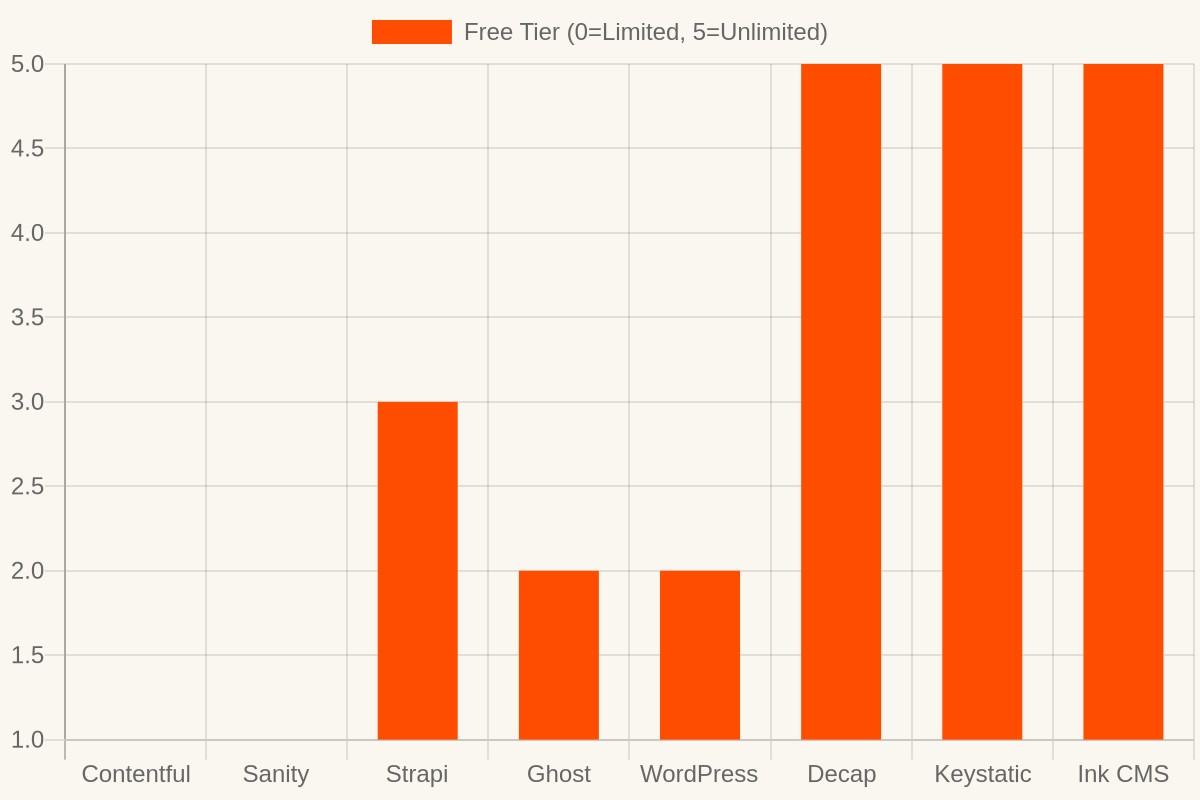
| CMS | Min Cost /mo | Free Tier | Lock-in | JS to Frontend | Self-hosted |
|---|---|---|---|---|---|
| Contentful | $300+ | 5 users only | API + proprietary | Preview scripts | No |
| Sanity | $99 | Bandwidth limited | API + proprietary | Preview scripts | No |
| Strapi Cloud | $27 | 14-day trial | Open source core | None | Yes |
| Ghost | $9–29 | No | Open source | Full JS bundle | Yes |
| WordPress + GraphQL | $5–15 | Self-hosted cost | Open source | Plugins add JS | Yes |
| Decap CMS | Free | Yes | Markdown + Git | None | Yes |
| Keystatic | Free | Yes | Markdown + Git | None | Yes |
| Ink CMS | Free | Unlimited | Markdown export | None (zero JS) | Cloudflare free |
WordPress + WPGraphQL
The familiar path. WordPress powers 43% of the web, so it must work, right? It does — technically. You install the WPGraphQL plugin, connect Astro’s GraphQL integration, and pull content.
The problem: You are now running WordPress. That means PHP, MySQL, security patches, plugin updates, and a server that needs babysitting. You traded a static site for a WordPress installation just so someone can edit a paragraph. The hosting cost alone — typically $5-15/month for anything decent — exceeds what many small sites cost to build.
There is also a security surface area problem. WordPress is the most attacked CMS in the world. The WPGraphQL plugin itself has had multiple critical vulnerabilities. Running WordPress just to feed content to Astro is like buying a truck to carry a sandwich.
Verdict: Use it if you already have WordPress. Do not spin it up just for Astro.
Contentful / Sanity / Strapi Cloud
The “modern headless CMS” pitch is seductive. A slick dashboard, an API key, and you are done. No servers. No database. Just fetch content at build time.
The problem: These are enterprise products priced for enterprise budgets. Contentful’s free tier caps at 5 users and 10,000 records — sounds generous until you realize every image, every draft, every revision counts. Sanity bills by bandwidth and dataset size. Strapi Cloud starts at $27/month. For a small business blog that publishes twice a month, you are paying SaaS money for a content inbox.
And there is a deeper issue: lock-in. Your content lives in their database, behind their API, in their proprietary format. The day they raise prices or change their API — and they will — your content is held hostage. We have watched Contentful change their pricing model twice in three years. Sanity raised their overage rates. Strapi pivoted from fully open source to “open core” with paid features.
Contentful’s JavaScript tax: The Contentful preview SDK injects a 52KB script into your page. That script enables live preview — useful for editors, but it loads for every visitor, not just editors. You are taxing 100% of your traffic to serve 0% of your visitors who happen to be editing.
Sanity’s JavaScript tax: The Sanity preview bundle is 48KB. It sets up a real-time listener that holds a WebSocket connection open on every page where it is installed. On mobile, that connection drains battery and data.
Verdict: Great for teams with budgets. Wrong for indie sites and small businesses.
Ghost
Ghost is the indie darling. Clean editor, built-in SEO, member subscriptions, Stripe integration. It is genuinely well-built. The Ghost team has spent years perfecting the writing experience, and it shows.
The problem: Ghost is a monolith. It runs its own Node.js server, its own database, its own theming system. If you want Ghost’s CMS but Astro’s frontend, you are running two servers side by side — Ghost for content management, Astro for rendering. The overhead is absurd for a 10-page site.
Ghost also ships its own frontend JavaScript — the full Ghost frontend bundle is around 120KB gzipped. That includes member authentication, subscription flows, comment systems, and search. If you are using Ghost as a headless CMS, you are paying for code you will never use.
Ghost’s pricing starts at $9/month for the basic tier and jumps to $29/month if you want custom themes or members. That is $108-348/year, forever. And Ghost requires Stripe for its subscription features — no Stripe available in your country, no memberships.
Verdict: Beautiful product. But it replaces Astro rather than working with it.
Decap CMS (formerly Netlify CMS)
The open-source, git-based CMS. Content is stored as Markdown files in your Git repo. The CMS dashboard is a React app that commits directly to GitHub. For a while, this was the indie default.
The problem: Decap is essentially abandoned. The last meaningful release was over two years ago. The editor UX feels dated — it looks like a 2019 admin panel, because it is one. There are open security issues that nobody is fixing.
Every content save triggers a full Git commit and rebuild. This means your non-technical client is interacting with version control whether they know it or not. Try explaining “I accidentally merged a conflict” to a restaurant owner. Or “the build failed because your image filename had a space in it.” Or “we can’t publish right now because the CI pipeline is backed up.”
There is also a rate limit problem. GitHub limits API requests to 5,000 per hour for authenticated users. A team of three editors making routine edits can hit that ceiling surprisingly fast.
Verdict: Was good. Now is the time to move on.
Keystatic
A newer git-based option, built by the Thinkmill team. Unlike Decap, it is actively maintained and integrates cleanly with Astro via the official adapter. The editor is modern, and the developer experience is genuinely nice.
The problem: Keystatic’s local mode requires running a local server — it does not work on a deployed site without a GitHub backend. And even then, content editors need a GitHub account to log in. For a non-technical client, “log in with GitHub” is a non-starter. We have tried this with three different clients. Two of them did not have GitHub accounts. The third had one but could not remember the password.
Keystatic still commits to Git, with the same rebuild-on-save overhead as Decap. Every typo fix triggers a CI build. Every image upload pushes to your repository. Your Git history becomes a content edit log, which makes actual code changes harder to review.
Verdict: The best git-based option today, if your editors are developers. Not suitable for non-technical clients.
The three-year cost reality
Monthly pricing hides the true cost. Let’s look at what you actually pay over three years — a realistic lifespan for a small business website.
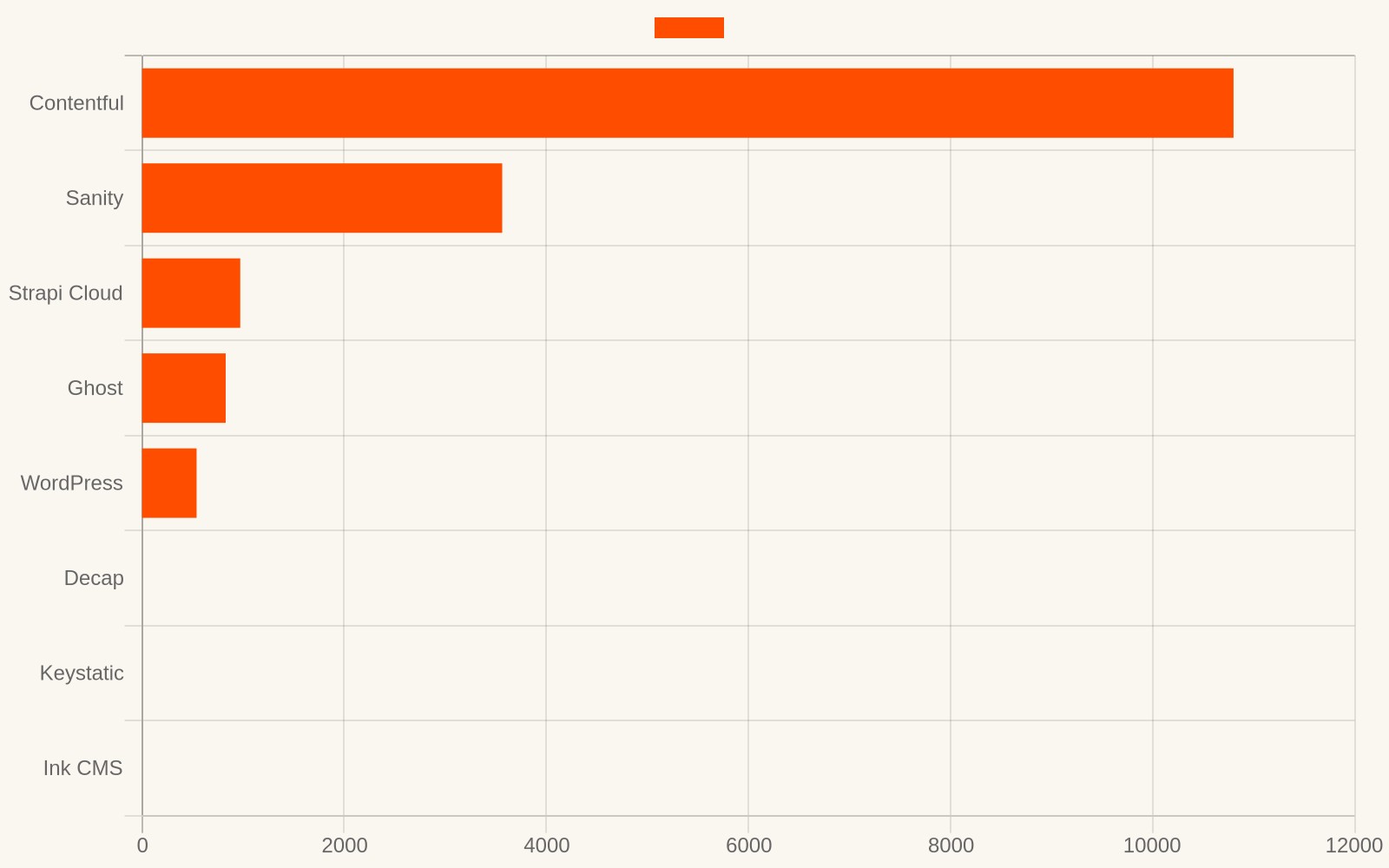
That is not a typo. Contentful costs $10,800 over three years. Sanity costs $3,564. Ghost costs $1,044. And these numbers assume you never upgrade tiers — which you will, because the free tier always runs out at the worst moment.
Now consider what else that money could buy. $10,800 is a new MacBook Pro. $3,564 is a year of Google Ads for a local business. $1,044 is three premium Astro themes plus a year of Cloudflare hosting — with enough left over for dinner.
Or you could pay $0 and get the same outcome.
What we actually needed
After running through every option above, we wrote down what we actually needed from a CMS for Astro sites. Not features — principles.
- Runs on free infrastructure. Cloudflare’s free tier, not a $15/month VPS. If the infrastructure costs money, the CMS costs money. Period.
- No JavaScript shipped to the frontend. The CMS is backend-only. The Astro site stays static. Zero compromise.
- Non-technical editors. Login with email and password, not GitHub. If your client needs to create a developer account to edit text, you have already failed.
- No lock-in. Content is Markdown with standard frontmatter. Export anytime, take your content anywhere. No proprietary format, no API dependency.
- Self-hosted. No per-seat SaaS pricing. No API rate limits. No “contact sales for enterprise pricing.” You run it, you own it.
No product on the market checked all five boxes. So we built one.
Ink CMS — open source, runs on Cloudflare’s free tier
Ink CMS is the headless CMS we built for our own Astro themes. It is free, open source, and runs entirely on Cloudflare’s free tier — D1 for the database, R2 for media, KV for rate limiting. No external database. No monthly bill.
What it does:
- Posts and pages with draft, schedule, and publish workflows
- Markdown native — content is Markdown with YAML frontmatter, exportable in one click
- Media library — upload images to R2, insert into posts
- AI writing assistant — optional DeepSeek or OpenAI integration for generating titles, excerpts, and tags
- Revisions — auto-snapshot on every edit, one-click restore
- API keys — scoped tokens for external tools (read-only, read-write, or admin)
- Webhooks — fire on publish for automated builds, social posting, or custom integrations
- Multi-user — admin and user roles, no GitHub account required
- Security — rate limiting, SSRF protection, CSP headers, PBKDF2 password hashing
What it does not do:
- Ship JavaScript to your Astro frontend. Zero. Your site stays as fast as the day you built it.
- Require a paid plan. The entire stack runs on Cloudflare’s free tier.
- Lock your content into a proprietary format. Every post is standard Markdown, exportable anytime.
The deployment cost breakdown
Here is what running Ink CMS actually costs on Cloudflare:
- D1 database: Free up to 5 million rows read per day. A typical blog with 200 posts and modest traffic will never approach this. To put it in perspective: a page that loads a blog post is 1 row read. You would need 5 million page views per day to hit the limit.
- R2 storage: Free up to 10GB. A media library with 500 images at 200KB each is 100MB — 1% of the free tier. You could store 50,000 images before paying a cent.
- KV operations: Free up to 100,000 reads per day. Rate limiting for a small team is negligible. Even a 10-person team making 50 requests each per day uses 500 operations — 0.5% of the limit.
- Workers: Free up to 100,000 requests per day. The CMS dashboard, API calls, and media uploads for a typical blog total maybe 500-1,000 requests per day.
Total: $0/month. Not “$0 with a credit card on file just in case.” Not “free for 14 days.” Free.
And if you ever outgrow the free tier — say your blog goes viral and you need millions of requests per day — Cloudflare’s paid tier starts at $5/month. That is still cheaper than every other option on this list.
Compare that to Sanity ($99/month for the growth plan), Contentful ($300+/month for teams), or a WordPress VPS ($5-15/month plus your time maintaining it). For an indie site, a portfolio, a small business blog — the math is not close.
Architecture: how Ink CMS and Astro work together
The key principle: Ink CMS is invisible to your visitors. It exists only in the backend. Your Astro site fetches content at build time and renders static HTML. No runtime API calls, no client-side fetching, no JavaScript from the CMS.
Here is the data flow:
- Editor writes in Ink CMS dashboard — a clean admin panel hosted on your Cloudflare Worker. They write Markdown, upload images, set metadata. Standard CMS workflow.
- Astro fetches at build time — during
astro build, your site calls the Ink CMS REST API endpoint. It receives Markdown with YAML frontmatter. - Astro renders static HTML — Markdown is converted to HTML, styled with your theme, and output as static files. The CMS is not involved in rendering.
- Visitor gets static HTML — the final page is pure HTML and CSS. No CMS scripts, no API calls, no JavaScript from the CMS. The page loads instantly.
This is the same headless pattern used by Contentful and Sanity, but without their JavaScript payload. The CMS and the frontend are completely decoupled. You could replace Ink CMS with another Markdown-based CMS tomorrow, and your visitors would never know.
Connecting your Astro site
In your Astro project, fetch content during the build:
// src/content/config.ts
import { defineCollection, z } from 'astro:content';

const blog = defineCollection({
  loader: async () => {
    const res = await fetch(`${import.meta.env.CMS_API_URL}/api/v1/posts`, {
      headers: { 'Authorization': `Bearer ${import.meta.env.CMS_API_KEY}` }
    });
    const posts = await res.json();
    return posts.map(p => ({
      id: p.slug,
      // ...map fields
    }));
  },
  schema: z.object({
    title: z.string(),
    // ...schema
  }),
});
Set two environment variables — CMS_API_URL and CMS_API_KEY — and your Astro site pulls content at build time. No runtime dependency on the CMS.
Rebuilding on publish
When an editor publishes a new post, you want your site to rebuild automatically. Ink CMS fires a webhook on publish:
- Editor clicks “Publish” in the CMS dashboard
- Ink CMS sends a POST request to your webhook URL
- Your webhook triggers a rebuild (Cloudflare Pages deploy hook, GitHub Action, etc.)
- The new content appears on your live site within 60 seconds
No manual rebuilds. No cron jobs. The editor publishes, the site updates.
Content portability: your data is yours
This is the part that most CMS comparisons skip, because it is the part that hurts.
When you use Contentful, your content is stored in their database in a proprietary format. If you want to leave, you can export JSON via their API — but that JSON is Contentful-specific. It does not map cleanly to any other CMS. You will spend days writing a migration script.
When you use Sanity, your content is in their real-time dataset. The export format is GROQ-shaped JSON. Again, proprietary.
When you use WordPress, your content is in a MySQL database with a specific schema. The export is WXR XML, which is… WordPress-shaped.
Ink CMS stores content as standard Markdown with YAML frontmatter. The same format that Jekyll, Hugo, Eleventy, Astro, Gatsby, Next.js (with MDX), and dozens of other tools understand. If you decide to leave Ink CMS tomorrow, you export your content as a ZIP of .md files and drop them into any other system. No migration scripts. No data transformation. No lock-in.
This matters more than people realize. We have spoken to developers who spent weeks migrating off Contentful. We have spoken to agencies who lost clients because the client wanted to switch CMS and the migration cost more than the original build.
Your content is your asset. It should not be held hostage by your CMS.
Security: what you need to know
A CMS is a login form on your website. That makes it a target. Here is how Ink CMS handles the fundamentals:
Authentication. Passwords are hashed with PBKDF2 (100,000 iterations, per-user salt). Session tokens are SHA-256 hashed and stored with 30-day expiry. No plaintext passwords anywhere — not in the database, not in logs, not in memory longer than necessary.
Rate limiting. Login attempts are rate-limited at 10 per minute per IP. Registration is capped at 3 per hour. Brute force attacks hit a wall fast.
API security. API keys are scoped (read-only, read-write, or admin) and SHA-256 hashed. You can create and revoke keys from the dashboard without changing your password. Keys are rate-limited per scope.
SSRF protection. Webhooks and external API calls are validated against a blocklist of internal IP ranges. No one can trick your CMS into fetching from http://localhost.
Security headers. CSP, X-Frame-Options DENY, X-Content-Type-Options nosniff, HSTS, Referrer-Policy. All set via middleware, not plugins.
None of this is revolutionary. It is basic security hygiene. But it is remarkable how many CMS options get these wrong. WordPress alone had 5,000+ reported vulnerabilities in the last decade. Ghost has had critical XSS issues. Decap had an open CSRF vulnerability for two years before anyone noticed.
Who is this for
Astro theme developers who need to ship a CMS with their theme without demanding clients pay a monthly SaaS bill. Your buyer downloads the theme, deploys Ink CMS, and hands off a complete package. No “you also need a Contentful account” conversation.
Freelance developers building client sites on Astro who want to hand off content management without training clients on Git or paying for a third-party CMS. You deploy once, hand the client a login, and you are done. The client never needs to know what Cloudflare or D1 or Markdown is.
Indie builders running content sites on Cloudflare’s free tier who want a real CMS instead of editing Markdown files by hand. Your costs stay at $0 whether you have 10 posts or 10,000. Your infrastructure scales automatically.
Anyone who has looked at Sanity pricing and thought “I just need to edit text.” This is most people. Most people do not need real-time collaboration, GROQ queries, or a PATCH-based patch API. They need a text box and a publish button. Ink CMS gives them that, plus just enough structure to keep things organized.
FAQ
Can I use Ink CMS with frameworks other than Astro?
Yes. Ink CMS exposes a REST API. Any framework that can fetch JSON at build time — Next.js, Gatsby, Eleventy, Hugo — can pull content from it. Astro is what we build in, but the CMS is framework-agnostic.
What happens if Cloudflare changes their free tier?
Your content is Markdown. Export it, move the CMS to any other host, and you are running again in minutes. The CMS runs on standard Web APIs — it is not locked to Cloudflare. We chose Cloudflare because their free tier is the most generous, not because the CMS requires it.
How many posts can it handle?
D1 is SQLite-based. SQLite handles millions of rows without breaking a sweat. A blog with 10,000 posts and 1,000 images uses roughly 50MB of database storage and 200MB of R2 storage. You are at 0.5% of the free tier.
Is the AI writing assistant required?
No. It is an optional feature that you enable by setting an API key (DeepSeek or OpenAI). Without the key, the feature is invisible. Your CMS works perfectly without any AI integration.
Can multiple editors use it simultaneously?
Yes. Multi-user support is built in. Admins can create and manage all content. Users can edit their own posts. Session management handles concurrent logins without conflicts. Two editors publishing at the same time do not produce merge conflicts, because the CMS uses a database with row-level locking, not a Git-based approach.
Does it support scheduled posts?
Yes. Set a future publish date on any post. The post stays in draft until that date. Ink CMS uses a lazy-publish approach — scheduled posts are checked on each read, so they publish at the right time without requiring a cron job or background worker. This is important on Cloudflare Workers, where long-running background tasks are not available on the free tier.
How does it compare to Payload CMS or Directus?
Payload CMS and Directus are excellent options for larger projects. Payload is a full-featured CMS with a React admin panel, built on Node.js with MongoDB or PostgreSQL. Directus is a headless CMS that wraps any SQL database with an API and admin UI. Both are powerful, both are self-hosted, and both are open source.
The difference is infrastructure. Payload requires a Node.js server running continuously. Directus requires a SQL database and a Node.js server. On Cloudflare Workers — which is serverless and edge-deployed — neither runs natively. You would need a separate VPS or container service, adding cost and complexity.
Ink CMS was built specifically for Cloudflare Workers. It uses D1 (SQLite) for the database, R2 for media, and KV for rate limiting. Everything runs on Cloudflare’s free tier, with no external server. If you need the power of Payload or Directus and are willing to pay for hosting, they are great choices. If you want $0/month and zero server management, Ink CMS is the answer.
What about internationalization?
Ink CMS stores a lang field on every post. You can create content in multiple languages and tag each post accordingly. Your Astro site can then fetch posts by language and render them in different paths (e.g., /en/blog/ and /zh/blog/). The CMS does not impose an i18n strategy — it gives you the data, and your frontend decides how to present it.
How do I handle image uploads?
Images are uploaded to Cloudflare R2 through the CMS dashboard. R2 is S3-compatible, so the upload pipeline is standard. Images are served via the CMS API or directly from R2, depending on your configuration.
The git-based trap
Several of the options above — Decap, Keystatic — use a “git-based” approach. Content is stored as Markdown files in your Git repository. This sounds elegant: your content is versioned, you can diff it, you can review changes before merging.
In practice, this is a trap for non-technical users.
The rebuild problem. Every content change is a Git commit, and every Git commit triggers a CI rebuild. Your client fixes a typo. That triggers a full Astro build, a Cloudflare Pages deploy, and a CDN cache purge. On a typical project, this takes 60-90 seconds. If the client makes three edits in quick succession — fix a typo, change a date, add a comma — they trigger three builds. Cloudflare Pages has a concurrency limit. Builds queue. The client wonders why their change “isn’t showing up.”
The merge conflict problem. Two editors publish at the same time. Git handles this gracefully for code. For Markdown content, it does not. Two commits that touch different files merge fine. Two commits that touch the same file — say, both editors editing the same blog post — produce a merge conflict that requires manual resolution. Your non-technical client is now staring at <<<<<<< HEAD in a text editor and calling you at 9pm.
The repository bloat problem. Every image uploaded through a git-based CMS goes into your repository. A year of blog posts with images turns your Git repo from 5MB to 500MB. Clone times slow to a crawl. CI builds take longer. GitHub starts complaining about repository size. You are now managing a media CDN via Git, which is like managing a fleet of trucks with a bicycle.
The history problem. Your Git history becomes a content edit log. “Fix typo in paragraph 3.” “Change heading.” “Add comma.” Actual code changes — bug fixes, feature updates, security patches — are buried under hundreds of content commits. Good luck doing git blame on a component when there are 300 intervening content commits.
Database-based CMSs — including Ink CMS — solve all of these problems. Content changes are instant (no rebuild needed for the CMS itself). Concurrent edits are handled by row-level locking. Images go to R2, not Git. And your Git history stays clean — it contains code, not copy edits.
Real-world scenarios
Let’s walk through three concrete situations where the CMS choice matters.
Scenario 1: The freelancer handing off a client site
You built a beautiful 8-page site for a local architect using an Astro theme. The design is done. The build is fast. Now the client wants to update their “Projects” page every few months without calling you.
With WordPress: You set up a $10/month VPS, install WordPress, configure WPGraphQL, train the client on the WordPress admin panel, and pray they don’t install a plugin that breaks the API. You also now have an ongoing maintenance obligation — PHP updates, security patches, plugin compatibility. The client pays $120/year forever, and you get a phone call every time WordPress updates break something.
With Sanity: You create a Sanity project, define the schema, connect the Astro build. The client gets a slick dashboard. But six months later, Sanity changes their pricing or API. You spend a weekend updating the integration. The client starts paying $99/month when they exceed the free tier.
With Ink CMS: You deploy Ink CMS to Cloudflare alongside the Astro site. Hand the client a URL, an email, and a password. They log in, edit text, publish. The site rebuilds automatically via webhook. Total cost: $0. Total ongoing maintenance: zero. If the client stops paying you, the site keeps running on its own.
Scenario 2: The indie blogger scaling up
You run a growing tech blog on Cloudflare Pages. You started with hand-written Markdown files — simple, fast, free. Now you publish twice a week, have a backlog of drafts, and managing images is becoming painful. You need a CMS.
With Decap CMS: You install Decap, configure the GitHub backend, and immediately hit the 5,000 API requests/hour limit during a productive writing session. Your images bloat the repo. Your Git history is unreadable. The dashboard looks like it was designed in 2019 — because it was.
With Contentful: You get a beautiful dashboard, but the free tier caps at 10,000 records. Each blog post with 5 images is 6 records. After 1,600 posts, you hit the wall. The bill jumps to $300/month. You are paying more for the CMS than for the content.
With Ink CMS: You deploy once. Write posts, upload images, schedule publications. The AI assistant generates excerpts and tags. Your total cost stays at $0 whether you have 100 posts or 10,000. Images go to R2, not your repo. Git history stays clean.
Scenario 3: The theme developer shipping a complete package
You sell Astro themes. Your buyers love the design, but every single one asks the same question: “How do my clients edit the content?” You need to recommend a CMS that works with your theme.
Recommending WordPress: Your buyer now needs a VPS, PHP, MySQL, and WordPress maintenance knowledge. The cost of ownership for their client triples. You get blamed for recommending a “complicated” solution.
Recommending Sanity: Your buyer creates a Sanity account, defines schemas, and pays $99/month if they exceed the free tier. Their client’s monthly cost goes up. You get asked “isn’t there a free option?” every time.
Recommending Ink CMS: Your buyer deploys Ink CMS to Cloudflare (free), sets two environment variables in their Astro project, and hands the client a login. Total cost: $0. The client edits content in a clean dashboard. The site stays fast. Everyone is happy, and nobody asks you for help at 9pm.
Migration: switching from another CMS
If you are currently using another CMS and considering switching, here is what the migration to Ink CMS looks like.
From WordPress: Export your posts as XML from WordPress. Write a simple script to convert each post to a Markdown file with YAML frontmatter. Import via the Ink CMS API or the built-in import feature. Typical migration: 2-4 hours for a 200-post blog.
From Contentful/Sanity: Export your content via their API. Map their proprietary JSON format to Markdown with frontmatter. This is the most painful step — their data structures do not map 1:1 to Markdown. But once converted, the content is portable forever. Typical migration: 4-8 hours depending on content complexity.
From Decap/Keystatic: You are already using Markdown files. Import them directly into Ink CMS via the API. This is the easiest migration — your content is already in the right format. Typical migration: 30 minutes.
In every case, the end result is the same: your content is Markdown, stored in a database you control, served by an API you own, running on infrastructure that costs $0.
Getting started
Ink CMS is free and open source on GitHub: github.com/Liteink/ink-cms
The setup takes about 15 minutes if you already have a Cloudflare account:
- Clone the repo
- Create D1, R2, and KV resources on Cloudflare (free)
- Run the database migration
- Deploy to Cloudflare Workers
- Set your API URL and key in your Astro project
- Done
No sign-up. No license key. No trial. No credit card. Just code.
If you are looking for an Astro theme to pair it with, browse our themes — all of them are Ink CMS compatible out of the box.
Want a site this fast?
Browse our Astro themes. Full source code, SEO-ready, yours forever. From $79.
Browse themes →