WordPress vs Astro for SEO: Which One Google Actually Rewards
Astro ships zero JavaScript by default and passes Core Web Vitals out of the box. We break down what that means for Google rankings — with the real numbers.
Every few weeks a small business owner asks us the same question: “My WordPress site is fine. Why would I switch to Astro for SEO? Google ranks content, not frameworks.”
That last part is true. Google does rank content. But it also measures how fast that content arrives, how stable it is while loading, and how quickly the page responds when someone taps a link. Those measurements are Core Web Vitals, they are computed from real user visits, and they are a confirmed ranking signal. The framework you choose does not write your content — but it decides your starting position on every performance metric Google measures.
So let’s compare the two honestly. Not “Astro good, WordPress bad” — the actual numbers, and what they mean for a site that needs to rank.
The short version
WordPress can rank. Roughly 43% of the web runs on it, including sites that rank #1 for brutally competitive keywords. Anyone telling you WordPress cannot rank is selling something.
But WordPress ranks despite its stack, not because of it. The typical business site we get called in to audit runs a page builder, a dozen plugins, and three megabytes of JavaScript to render what is fundamentally text and images. Astro sites start from the opposite position: zero JavaScript ships by default, and interactivity is added only where a component genuinely needs it.
The result is a performance gap you can measure on every page load, on every phone, forever — and performance is where the easiest ranking wins live.
What Google actually measures
Before the comparison, the ground rules. Google’s page experience system leans on three field metrics, collected from real Chrome users via the CrUX dataset:
- LCP (Largest Contentful Paint) — how fast the main content appears. Good is under 2.5 seconds.
- INP (Interaction to Next Paint) — how fast the page responds to a tap. Good is under 200 milliseconds.
- CLS (Cumulative Layout Shift) — how much the page jumps around while loading. Good is under 0.1.
None of these mention frameworks. All three are decided, to a large degree, by how much stuff the browser has to download, parse, and execute before the page is usable. That is where the two stacks diverge.
Round 1: Page weight and JavaScript
Here is the uncomfortable baseline. The median web page in 2025 weighs about 2.6 MB on desktop and 2.3 MB on mobile, and JavaScript has overtaken images as the most-requested resource type — around 24 script files on a median page.
A typical WordPress business site sits above that median, sometimes far above. The pattern is familiar: a theme, a page builder like Elementor, an SEO plugin, a security plugin, a forms plugin, a slider plugin, an image optimizer plugin — each one enqueueing its own CSS and JS on every page. We regularly audit WordPress sites shipping 3 MB or more to display a five-page brochure site.
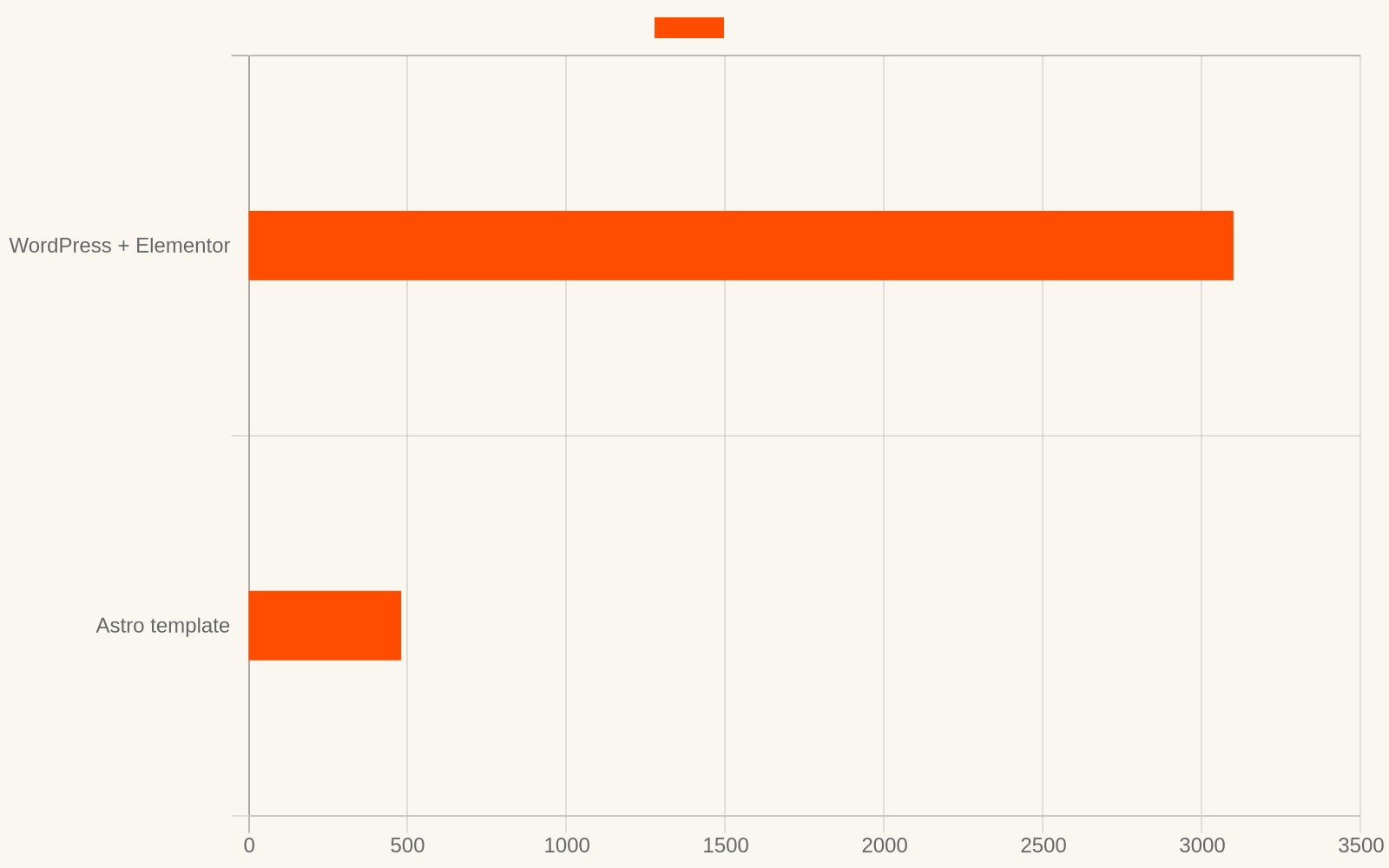
An Astro site for the same business typically ships a few hundred kilobytes total, often less. Astro renders pages to plain HTML at build time. No framework runtime is sent to the browser unless a specific component declares that it needs interactivity. There is no page builder, no plugin chain, no jQuery dependency you didn’t ask for.
Why this matters for SEO specifically: every kilobyte of JavaScript is parsed and executed before the page becomes interactive. On a mid-range Android phone — which is what Google’s field data is dominated by — parsing 3 MB of JS takes seconds. That time goes straight into your INP and, indirectly, your LCP.
Round 2: Core Web Vitals pass rates
According to the 2025 Web Almanac, only 48% of mobile pages and 56% of desktop pages pass all three Core Web Vitals. More than half the mobile web fails.
Break it down by stack and the gap widens. LCP is the metric most sites fail — only around 62% of mobile sites hit the 2.5-second threshold per CrUX data. The culprits are render-blocking resources, server response time, and client-side rendering. WordPress sites without aggressive caching commonly fail LCP because the page is assembled on the server per-request, then hydrated on the client. Plugin-heavy configurations add render-blocking CSS and JS on top.
Astro sites attack all three failure modes by construction:
- Pages are pre-built static HTML — server response time is CDN edge cache, measured in tens of milliseconds.
- No hydration step — the HTML is the final render. LCP fires when the HTML arrives, not after JavaScript boots.
- Only components that explicitly opt into interactivity ship any JS at all — most pages ship none.
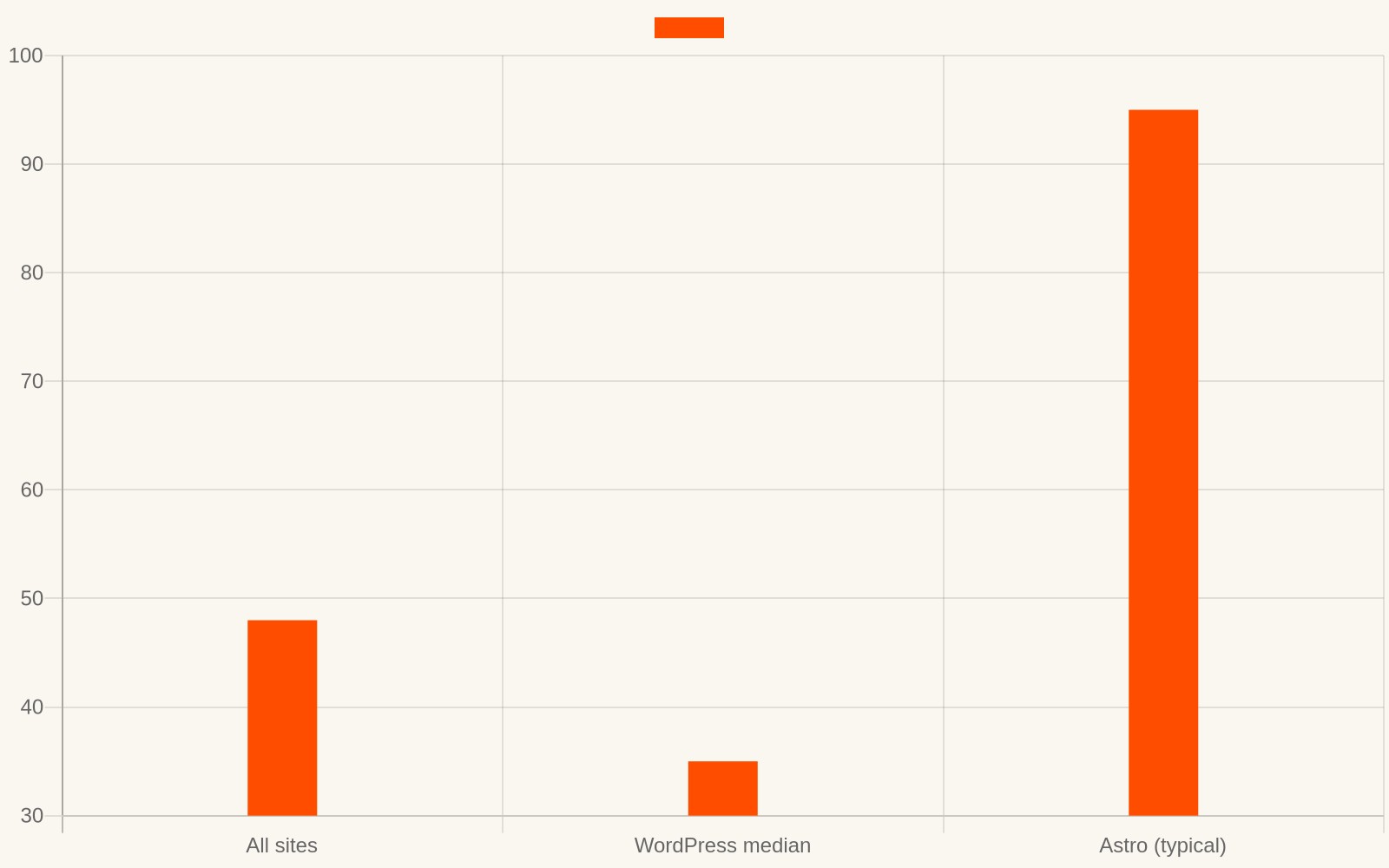
In practice, every Astro site we ship passes all three Core Web Vitals in the green from day one. We have never had to “optimize” an Astro template for CWV after launch. WordPress sites, in our experience, require ongoing performance work just to stay in the yellow — a caching plugin, a minification plugin, a CDN layer, then re-auditing after every plugin update.
Round 3: The SEO surface area
Core Web Vitals aside, SEO is mostly about what you can control: titles, canonicals, sitemaps, structured data, clean URLs, content structure. Here both stacks can get the job done — but the effort curves point in opposite directions.
WordPress: the Yoast or RankMath plugin gives you title editing, sitemap generation, and schema toggles. It works. The cost is that your HTML is generated by a theme author and filtered through a dozen plugins, and any of them can silently mangle output. When something breaks — a duplicate canonical, a stray noindex, a stylesheet leaking into the page — you are debugging a stack you don’t fully control.
Astro: you own the HTML. Every tag in the document is one you or your template author wrote. Canonicals, hreflang, JSON-LD, OG tags, sitemap entries — they’re literal lines in the source, not plugin settings. When Google’s crawler reads an Astro page, it gets the same HTML a visitor gets, with zero client-side assembly required.
That last point matters more than it used to. Google does render JavaScript, but rendering is queued, delayed, and costs crawl budget. A page whose full content is in the raw HTML gets indexed faster and more reliably than a page the crawler has to render first. This is also directly relevant to AI search — ChatGPT, Perplexity, and Google’s AI Overviews fetch pages and extract from the raw HTML. Static, semantic, content-complete HTML is the most machine-readable format that exists. If GEO (generative engine optimization) is on your roadmap, a zero-JS site is the best possible starting position.
Round 4: Security and maintenance (the hidden SEO risk)
This one gets ignored in framework comparisons, and it shouldn’t be, because it can wipe out years of ranking work overnight.
The 2025 Patchstack report counted 11,334 new vulnerabilities in the WordPress ecosystem — a 42% increase over 2024. 91% of them were in plugins and themes, not WordPress core. Roughly 13,000 WordPress sites get hacked per day. A hacked site is an SEO catastrophe: injected spam pages, cloaked redirects, malware warnings in search results, emergency delisting while you clean up.
Astro sites compile to static files. There is no database to inject into, no admin panel to brute-force, no plugin supply chain to compromise. The attack surface of a folder of HTML files on a CDN is effectively nil — not zero, but a rounding error next to a PHP application with 15 third-party plugins that each need security updates forever.
Maintenance follows the same shape. WordPress needs core updates, plugin updates, theme updates, database cleanup, and a hosting bill that scales with traffic. An Astro site needs a redeploy when content changes. That’s it. There is nothing to update, because there is nothing running.
The honest trade-offs
Astro is not free lunch, and pretending otherwise would make this article useless.
WordPress wins when you have non-technical staff publishing daily, you need an ecosystem plugin for something niche (membership, booking, complex ecommerce), or your budget covers ongoing maintenance and you accept the performance tax. WooCommerce has no real Astro equivalent. If your business is a store, WordPress is still a defensible choice.
Astro wins when your site is a content and lead-generation surface — the five-to-thirty-page site that most service businesses actually need. Marketing site, portfolio, documentation, blog, local landing pages. For that shape of site, Astro is faster, safer, cheaper to run, and structurally better positioned on every metric Google and the AI engines measure.
There is also a middle path worth naming: headless WordPress (content editing stays in WP, the front end is Astro). It works, and we cover the tooling in our headless CMS comparison. But be honest with yourself about whether you need a CMS at all. Most small business sites change a few times a year. A well-structured template with editable config files is simpler than any CMS, and our zero-JavaScript approach covers why that simplicity is a feature.
What we would do
If you are starting a new business site in 2026: start on Astro, or an equivalent static-first stack. You get CWV-green performance, a static security posture, and machine-readable HTML for both search engines and AI answer engines, without doing anything clever. Our Astro templates are built exactly for this — and if you are weighing platforms by cost, we did the five-year math against Squarespace already.
If you are on WordPress and ranking: don’t panic-migrate. Migrations carry their own risk, and content quality still beats stack quality. Fix what’s fixable — caching, image formats, plugin count — and measure with the Core Web Vitals report in Search Console.
If you are on WordPress and not ranking, and your PageSpeed scores are red on mobile: the stack is working against you every single day. That is the moment rebuilding on a static stack stops being an aesthetic preference and becomes the highest-ROI SEO decision available to you. The gap between a 3 MB page and a 400 KB page is not a rounding error on mobile — it is often the difference between a visitor who reads and a visitor who leaves before the page paints.
Google ranks content. But content has to arrive first.
Want a site this fast?
Browse our Astro themes. Full source code, SEO-ready, yours forever. From $79.
Browse themes →